

Learning how to run ads on Facebook can feel overwhelming at first. However, every business owner and advertiser can master it. The starting point is simple: keep an open mind. Meta advertising rewards people who are willing to learn, test, and adjust their approach. Therefore, before you touch a single button inside Ads Manager, it helps to approach the process as a student rather than an expert.
This article is a complete step by step guide to Facebook advertising. It covers the buying types inside Meta’s system. It also covers the exact levels you will work through when you create a Facebook ad campaign. Whether you are searching for a Facebook ads tutorial for beginners, or you already run campaigns and simply want a refresher, this guide walks you through the entire process. By the end, you will understand how to launch Facebook ads with clarity and confidence.
Understanding Meta Ads Before You Begin
To run profitable Facebook and Instagram advertising, you first need to understand how the Meta Advertising Platform works. Equally important is learning how to align that platform with your business goals. Without this alignment, even a beautifully designed ad can struggle to deliver real results.
It also helps if you already have a background in business development. Project management training is useful too. This is because running Meta ads is not simply a technical task. Instead, it is a strategic one. In fact, the biggest issue most business owners face is not learning how to click through Ads Manager. Rather, the real challenge lies in developing a strategy for using that tool effectively.
With that in mind, let’s break down Facebook Ads Manager step by step. We recommend starting on your laptop or desktop computer. This is because the desktop interface gives you the most complete view of the platform.
Before diving into the setup process, we strongly recommend using a business portfolio ad account whenever you advertise on Meta. A business portfolio account keeps your ad activity organized. It also keeps things secure and easier to scale as your campaigns grow. If you need assistance setting this up, feel free to contact us on WhatsApp. Alternatively, you can place a booking directly with our team.
Step 1: How to Set Up Facebook Ads Manager – The Overview
Once your account is ready, the next step in this Facebook ads tutorial for beginners is understanding how Ads Manager is structured. Facebook, or more accurately Meta advertising, is divided into two major buying types. Understanding the difference between these two options is essential. After all, it directly affects how well you run Meta ads that actually convert.
1. Auction
Auction is the most widely used buying type across Meta’s advertising ecosystem. It operates in real time. This means different advertisers compete, or “bid,” against one another for the same audience. Consequently, the winning ad is shown to users across Meta’s family of apps and products.
It is worth noting that winning this auction is not only about how much money you spend. The quality of your ad also plays a major role. In other words, a well-crafted and relevant ad can outperform a higher budget attached to a poorly designed one.
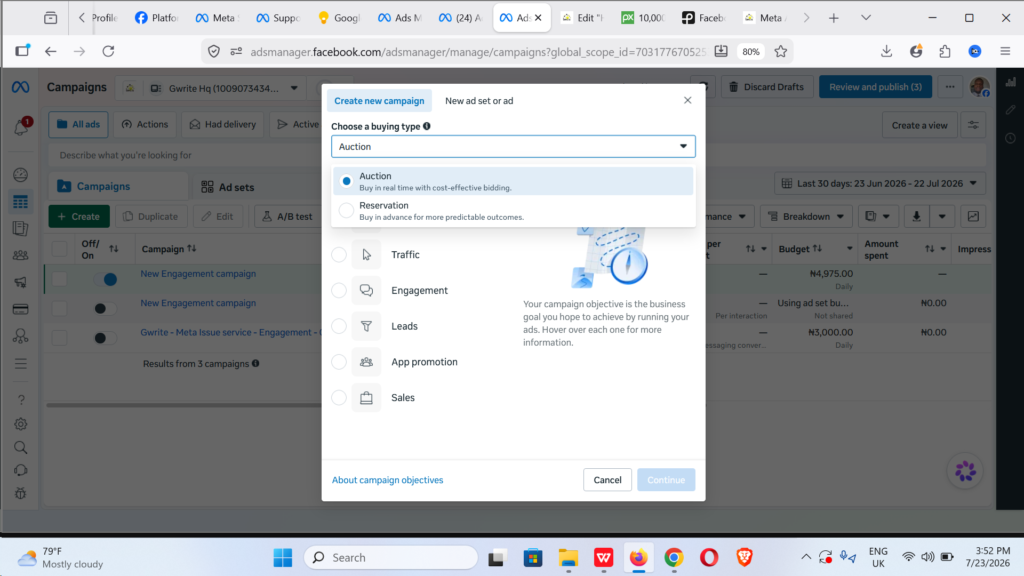
2. Reservation
Reservation, previously known as Frequency and Reach, works differently. Rather than competing in real time, this buying type allows outcomes to be more predictable. This is because the placements are bought in advance. As a result, Reservation tends to suit advertisers who need guaranteed reach or specific timing, such as during a product launch or a major announcement.
Choosing a Campaign Objective
After understanding the buying types, the next part of learning how to create a Facebook ad campaign involves choosing the right campaign objective. Meta ads objectives represent the business goals you hope to achieve through the platform. Currently, these objectives fall into six main categories.
1. Awareness
The Awareness objective shows your ads to people who are most likely to remember your brand afterward. Consequently, this objective works well for Reach campaigns, Brand Awareness campaigns, and Video Views campaigns. If your primary goal is simply visibility, Awareness is where you should begin.
2. Traffic
The Traffic objective sends people to a specific destination. This destination could be your website, your app, your Instagram profile, or even a Facebook Event. Because of this flexibility, Traffic works perfectly for Link Clicks, Landing Page Views, and Instagram Profile Visits. It also supports Messenger, Instagram, WhatsApp, and Calls.
3. Engagement
If your business needs more messages, this is your objective. It also helps with purchases made through messaging, video views, post engagement, page likes, and event responses. This objective performs especially well across Messenger, Instagram, WhatsApp, Video Views, Post Engagement, Conversions, and Calls.
4. Leads
The Leads objective, as the name suggests, helps your business generate leads. It applies to Website and Instant Forms. It also works for Instant Forms alone, Messenger, Instagram, WhatsApp, Conversions, and Calls. Businesses that rely on collecting customer information before a sale often find this objective indispensable. This includes service providers and B2B companies in particular.
5. App Promotion
For businesses with a mobile app, the App Promotion objective is ideal. It helps you find new people who are likely to install your app. Just as importantly, it helps them continue using it afterward. This objective drives both app installs and app events. As a result, it remains a strong choice for app-based businesses looking to grow their user base.
6. Sales
Finally, the Sales objective helps you find people who are likely to purchase your product or service. It performs particularly well for Conversions, Catalog Sales, Messenger, Instagram, WhatsApp, and Calls. Naturally, most e-commerce businesses gravitate toward this objective. This makes sense, since it ties directly to revenue generation.

Step 2: Matching Objectives to Real Business Goals
Before diving deeper into how to navigate Facebook Ads Manager, it helps to review a few quick recommendations. These are especially useful if you are just getting started with how to run Meta ads.
For awareness campaigns, choose the Awareness objective. This will maximize reach and encourage ad recall.
- For closing sales through direct messages, including WhatsApp, go for the Engagement or Sales objective. Additionally, make sure your ad is optimized for message conversations or sales generated through messaging.
- For growing your Facebook page and Instagram followers, select the Traffic objective. Then, choose profile visits as your specific outcome.
- For website sales, the Sales objective is the right choice.
- For app installs or in-app purchases, go with the App Installs objective.
- For generating quality leads and collecting customer details, the Leads objective is your best option.
These represent some of the most popular objectives used across Meta. Matching them correctly to your goal is often the single biggest factor separating a profitable campaign from a wasted budget.
How to Create a Facebook Ad Campaign: The Ad Setup Structure
Once you select your campaign objective, it is important to understand something else. Meta Ads setup is divided into three major levels. You will also notice two control options along the way. The first is Tailored Control, which is largely optimized by Meta’s own system and requires less manual effort. The second is Manual Setup, which gives you, the advertiser, far greater control.
The three levels of Meta ads setup include:
- Campaign Level
- Ad Set Level
- Ad Level
Understanding each of these levels individually is essential. This is how you master setting up Meta ads on Facebook with confidence.
Campaign Level
At the Campaign Level, you select your buying type. By default, you will typically see Auction already selected. This is also the stage where you declare a special ad category, if applicable. Meta requires this declaration for campaigns under Real Estate, Employment or Job listings, Finance, or Social Issues and Elections.
Furthermore, the Campaign Level lets you determine your budget at this stage. This is sometimes called a budgeting strategy applied across the entire campaign. Other available options at this level include Live Video Ads, A/B Testing, and, in some cases, Campaign Spending Limit optimizations. Altogether, this level lays the foundation for everything that follows.
Ad Set Level
Next comes the Ad Set Level. This determines your conversion location, meaning the specific place where the intended action is expected to happen. This is also where you choose your performance goal. In most cases, this is where your budget is actually selected.
At this stage, you can choose a lifetime budget. This means you select a total amount to spend across a specific period. Alternatively, you can choose a daily budget, where you tell the system exactly how much to spend each day. Both approaches have advantages. The right choice often depends on how much control you want over daily spending versus overall flexibility.
Identity is also determined at the Ad Set Level. This is where you indicate which assets will deliver your ads across the platform. These include your Facebook Page, Instagram account, WhatsApp account, and, depending on the campaign objective, your Pixel or App.
Finally, targeting takes place here too. This represents one of the most important parts of this entire guide. If you are searching for how to target audiences on Facebook ads, this is precisely where that process happens. You can choose broad targeting, which gives Meta’s system more flexibility to find your ideal customer. Alternatively, you can choose detailed targeting, where you specifically define audience behaviors or interests. Placement selection also occurs here. This determines exactly where your ads will appear across Meta’s apps.
In summary, the Ad Set Level is where most of the technical decision-making happens. Because of this, it is worth spending extra time here. Doing so ensures every setting aligns with your overall strategy.
Ad Level
The Ad Level is often considered the creative heart of the setup process. This is because creativity is expressed and finalized here. In some campaign objectives, page identity is also determined at this level. So is how people will interact with the content they encounter on Facebook, Instagram, and other Meta ad placements.
A key strategy at this level involves launching multiple ads under a single Ad Set. This approach supports Meta’s Advantage+ AI system as well. It helps the platform match engaging content to the right audience automatically. The result is a smoother experience for your audience. It also leads to stronger conversion outcomes for your business or brand.
When uploading or selecting your media, keep the following in mind. Creatives can be expressed in several different formats, depending on the campaign objective you have chosen. These formats typically include:
- Single Image or Video
- Carousel
- Collection
At the end of the Ad Level, you also choose which tracking assets to use. These help you measure performance and optimize future ad delivery. This step matters more than many beginners realize. Accurate tracking is what allows you to understand which ads are truly working.
How to Run Instagram Ads Through the Same Platform
One advantage of learning how to run Meta ads is this: the same knowledge automatically teaches you how to run Instagram ads too. Meta owns both platforms. As a result, Facebook and Instagram share the same Ads Manager. They also share the same campaign objectives, and largely the same setup process described throughout this guide.
In other words, once you know how to run ads on Facebook, you already know most of what is required to run ads on Instagram. The main difference comes down to placement selection at the Ad Set Level. There are also minor creative adjustments needed to fit Instagram’s visual format, such as Stories or Reels. Consequently, businesses that master this single system gain the ability to advertise across two of the world’s largest social platforms. Best of all, they do not need to learn two separate tools.
Bringing It All Together: A Step by Step Guide to Facebook Advertising
To summarize everything covered so far, here is a simplified overview of how to launch Facebook ads successfully:
- Set up a business portfolio ad account before you begin.
- Decide between Auction and Reservation as your buying type.
- Choose the campaign objective that matches your actual business goal. This could be Awareness, Traffic, Engagement, Leads, App Promotion, or Sales.
- Move to the Campaign Level. Confirm your buying type, declare any special ad category, and set your overall budgeting strategy.
- Progress to the Ad Set Level. Define your conversion location, performance goal, budget type, identity, targeting, and placements.
- Finish at the Ad Level. Upload creatives, select formats such as single image, video, carousel, or collection, and choose your tracking assets.
- Launch your campaign. Then, monitor performance and adjust based on results.
Following this order consistently separates advertisers who guess from advertisers who strategize. Moreover, Meta’s system rewards both relevance and quality. Taking time at each level ultimately pays off through lower costs and stronger results over time.
Frequently Asked Questions About Running Meta Ads
How do I set up Meta ads on Facebook if I am a complete beginner?
Start by creating a business portfolio ad account. Next, open Ads Manager and choose a campaign objective that matches your goal. Then work through the Campaign Level, Ad Set Level, and Ad Level in order. Each level builds on the one before it, so following the sequence matters more than rushing ahead.
What is the fastest way to launch Facebook ads for the first time?
The fastest path is to keep your first campaign simple. Choose one clear objective, such as Traffic or Engagement. Then use Tailored Control at the Ad Set Level, since the system will handle much of the optimization for you. As you gain experience, you can gradually shift toward Manual Setup for more control.
Can I run the same campaign on both Facebook and Instagram at once?
Yes. Because Facebook and Instagram share the same Ads Manager, you can select both placements within a single Ad Set. This means you do not need to build separate campaigns for each platform. Instead, you simply choose your placements during the Ad Set Level, and Meta handles delivery across both apps.
How do I know which campaign objective to choose?
The objective should always match your actual business goal, not simply what looks appealing. If you want visibility, choose Awareness. If you want website visits or profile growth, choose Traffic. If you want conversations or purchases through messaging, choose Engagement or Sales. Matching intent to objective is one of the most important decisions in this entire process.
What is the difference between Auction and Reservation buying types?
Auction is real-time and competitive, with ad delivery influenced by both budget and ad quality. Reservation, on the other hand, is bought in advance and offers more predictable outcomes. Most advertisers, especially beginners, will primarily use the Auction buying type.
Final Thoughts on Running Profitable Meta Ads
Mastering how to run Meta ads does not happen overnight. Nevertheless, once you understand the structure covered in this guide, the entire process becomes far more manageable. This includes choosing between Auction and Reservation, selecting the right objective, and working through the Campaign, Ad Set, and Ad levels.
Ultimately, success on this platform comes down to combining technical setup with clear business strategy. Anyone can learn to click through Ads Manager. However, understanding how to align those clicks with real business goals is what truly separates profitable advertisers from everyone else.
We will also be sharing video guides and playlist recommendations soon. These are designed to help you go even deeper into becoming an expert advertising specialist across Meta. In the meantime, if you need help setting up your account, or if you would prefer our agency to manage advertising campaigns for your business directly, feel free to contact us on WhatsApp. You can also place an order with our team today.
Explore the Below Playlists on YouTube